Friday, October 09, 2009

Steve Smith : Scalling out a SharePoint farm and configuring network load balancing on the web servers

Steve Smith full video session during the SharePoint Conference in Slovenia (2008).
A great session every SharePoint Pro needs to see!

Scalling out a SharePoint farm and configuring network load balancing on the web servers from Matjaz Korenjak on Vimeo.


Visit Steve's Web site at: http://www.combined-knowledge.com/

Thursday, October 01, 2009

How to create users in Windows 2003, the easy way

If you use Windows Server 2008 and you need to create users in your Active Directory there is a good way to do it.

  • You will need to use MS Excel for creating the command line to create your users.
  • You will need to have administrative rights for the server where you wish to create the users on.
The normal is to get the name of the user and the email. It is ideal to get all the rest automatically.

Your Excel file should start like that:
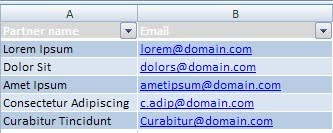


How to separate a name from a lastname in Excel and divide them in 2 columns?

The first problem is that you might want to separate the Name from the Lastname in order to have a better DB or just to make a mail merge for a future email notifying with the new username and password. The formula (Office 2007) should be like that:
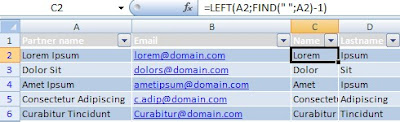

To retrieve the lastname the formula would be like that:


Then you can use any other formula or algorithm to generate the passwords. After you have that information you need the column that will generate the command line:


Of course the formula considers the names of the columns as I created them but you can modify that. The formula is not so visible on the image so here you have it: ="net user"&" "&Table1[[#This Row];[Username]]&" "&Table1[[#This Row];[Password]]&" /add /domain"

Then you will see how Excel magically transforms the information you have (emails and names) in the full command line you need for creating your users using the command prompt.

The last advise is to copy and pasthe the all the column, excluding the name of the column, in a TXT file to avoid problems of formatting. Now you can rename the the TXT file into a BAT file. The file should be moved to the server and executed, all the users would get instantly created.


Professional Web site templates

I normally use Google reader for receiving RSS updates of what is interesting on the Web. Yesterday I found a Web site that offers many kinds of templates for Web sites. They aren't free but they are very affordable, in most of the cases the PSD file is included in the price and that gives the chance to make modifications on the template directly from PhotoShop.


I personally like very much the WordPress themes. (Click on the image to visit the site)


If you are looking for a hosting provider feel free to contact me.

Thursday, September 10, 2009

How to Share backups of SharePoint SItes with your customers?

We are runing periodical backups using STSADM.exe. To do it we use a batch file that incldues all the instructions we need to: run the backup and specify the storage location.
The backups we use are "name.dat" and that extension is not supported by default by IIS. That means that a user would not be able to download it.

Why would I need a user to download the .dat file? Because that user is a customer and providing them with a copy of her/his site backup is a good way to decrease risk in case of emergency.

The first idea would be to share within his own SharePoint site a folder where to store the backups. But that is not a good idea because otherwise the next backup will make a backup of the site plus all the backup files inside... and end with a huge file size. It would also overcrowd the SQL Server unnecessarily.

My second idea is I think better, I made an IIS Web site, without SharePoint, and created all the folders (virtual directories from IIS) needed for each one of my customers to have a URL, something like backup.xxx.com/customer/ I made the right permissions of course so only their administrator could access that. Wel having tens of customers is a problem for permissions... (maybe there is a good way to automate the process).

The customer folders are set to let "browse" and "read". That makes the files within the folder visible and downloadable. Now the problem is that IIS does not support ".dat" files by default for security reasons. What you need to do to solve the problem is to create a MIME type:

Associated Extension: .dat
Content Type(MIME): application/octet-stream
Check the instructions.

Now we have a new service to include in our hosting service!

Monday, August 10, 2009

SharePoint Simple CMS Partners in the World


View B4Contact and SharePoint Simple CMS Partners in a larger map

Wednesday, August 05, 2009

First list of speakers for SharePoint Conference in Slovenia

I'm happy to share with you the first list of SharePoint experts that will speak on the Slovenian SharePoint Conference that will take place on November 27:

Claudio Brotto, MVP, Italy
Zlatan Džinič, MVP, South Africa
Toni Frankola, Croatia
Michael Gannotti, US
Daniel McPherson, Netherlands
Agnes Molnar, MVP, Hungary
Sarju Raja, US
Steve Smith, MVP, UK
Andrew Woodward, MVP, UK

Feel free to join the FaceBook group of the conference by clicking here.
Or visit the conference's Web site: www.sharepointconference.si

Friday, July 10, 2009

MS Word and problems formatting merged data

I have developed a simple template in Word 2007 that reads information for invoices from a MS Acess Data Base. It is very cool because using Word's mail merge functionality I can print invoices easily.

The system has 3 parts:

  1. A Windows SharePoint Services intranet. There we include all the new orders from customers into a list called "invoices", that list is related to another one named "Accounts" that provides the name and details about customers.

  2. A MS Access DB merges both SharePoint lists and filters all what has been invoiced in the past.

  3. A MS Office Word document template that receives the processed information from Access and create the invoices.

The problem is that Word does not formatt the information correctly. For example the amounts that are formatted as "currency" doesn't display the currency symbol; or the dates are displayed in american formatting (month/day/year). So how to change it?

There is something called "switches". Click here to find all of them.

So, once you know which kind of switch you need to use, yo will need to do the following:

  1. Select the merged field

  2. on your keyboard press "Shift+F9" and you will see that the field changes

  3. Add the switch

  4. "Shift+F9" again

  5. Right click on the merged field and select "Update field"


Thursday, July 09, 2009

PALM and Adobe

Once I have sent an email message to Palm, that was many years ago, sending them some sincere and constructive feedback. I said to them, between other things, that competing with Microsoft was to get into the rat's race where many finished bad. And the arrogant answer I received was: "We are sorry but Palm does not accept feedback from outside the company". Years later and with problems piled up I'm sure Palm is not arrogant as before. Now they need ideas and success. If they achieved it, better for all of us.


The World of operating systems is getting close to a very interesting moment.
Palm introduced the WebOS, Google is talking about a Chrome OS, Microsoft is not talking about a secret project called Midori.

In the meantime Adobe is creating really cool and innovative Web applications destined to be even better while all the others are trying to get the media on their side. I'm talking about Acrobat.com.
Apple is doing well but not perfectly well. The update to OSX 10.5.7 is still painful for many users. And it is coming to the common sense that a never crashing OS is more a myth than anything else. Apple failed with MobileMe, even now is getting much better.
Linux is also getting a good share of attention, the latest version of Ubuntu is really good!

So what is there for you? well, Microsoft tends to make good products when is under pressure. When they thought they are invincible they forgot about Internet Explorer, released Windows Vista and made a mess of Live services. And I think Microsoft wasn't so vulnerable in years! and I think that is not over.
Eachone of us will like more to experiment and try different OS. We will be able to do that easier than ever.
Competition will be fierce and I believe will be needed for contestants to be stronger.

Why not Adobe and Palm as a team? I think that would be a good mix. Adobe has the Web apps and Palm the OS. They don't need to run the same rat's race. Just to work together to get a nice WebOS into a beautiful and very functional productivity platform. I think that PALM needs to expand the concept of their business and the opportunity is that lightweight computers are becoming popular. PALM introduced in the past the idea of a Phone companion and after that unsuccessful initiative many things changed: more Web oriented phones, Netbooks, cravings about a Mac tablet computer. That makes me think that the World is now ready for notebooks and desktop computers that run the same OS. Something like the iPhone, but including desktop and mobiles apps. For example:
  • I would be happy to install a Word processor in my notebook and have it automatically available in my phone and other computers.
  • I would like to install a game on my phone and being able to play it in my notebook.
Adobe and Palm could do it.

Monday, July 06, 2009

Effective communication and the IT PRO

Have you went trough the problem of being too techie for the rest of the organization? So far that your ideas are underestimated?


Many IT pros share that frustration. Many of us feel like we could provide much more value to the companies where we work but our superiors just can't get it! It is easy to feel like any additional effort is worthless.

I found out that the problem is a communication one. Even we understand how the company works and we know how to fix processes our superiors speak about profit, revenue and cutting costs when we speak about information security, information flows, bandwidth and others.

We are not speaking the same language! But we need them to care about our opinions and ideas.

If we want to be capable of growing our influence within the organization we need to achieve others to care about the value we can provide. We need to learn to communicate our ideas in such a way that they "stick". I advise you to give a check on "Made to STick" or to join the Facebook group for the same title.

I have learned that one of the problems is that when we speak we start from the point our experience and knowledge is. That means that we forget when we didn't know what we know now and that becomes a principal barrier. In the other side the one listening also understands according to what they know now, not what they knew. So how to make them care? How to achieve effective communication?

Well it is not only about saying stories. It is more to call their curiosity with topics they understand. Comparisons, proverbs and of course a clear sense of value. The book is really cool!

Friday, June 26, 2009

/fyi Newsletter SharePoint Simple CMS


SharePoint and Firefox


Good news! We have achieved to integrate TinyMCE and SharePoint Simple CMS. Soon our partners will be capable to develop good looking SharePoint sites that can be editable in Firefox and Safari.


SharePoint Simple CMS Partnership


Our partnership program provides you with access to all the source code used to develop SharePoint Simple CMS. Then you can use it and resell it as many times as you wish. The partnership subscription is for one year and the investment is 500 EUR.


SharePoint hosting


Are you thinking to host your customers Web sites? We will pay 80 EUR per each new customer that you bring to our hosting service. If you are interested to participate please drop me a line.


SharePoint Conference

The Slovenian SharePoint conference is set to the end of November. If you are interested in participating as an attendee, speaker or sponsor please visit: www.sharepointconference.si

Please feel free to contact me:

Twitter: http://twitter.com/joseamorales

Facebook: http://www.facebook.com/b4contact

FaceBook group for SharePoint Simple CMS: http://www.facebook.com/group.php?gid=10403763463

Wishing you a good weekend,


Jose Antonio Morales

www.sharepointcms.com
+386 31 680 441