Showing posts with label Apple. Show all posts

Tuesday, June 29, 2010

Apple TV and the future

So far Apple TV is a great product that is under used.
Actually I use it each day for podcasts, buying TV shows and movies from iTunes. I have no cable TV and that is the reason why my family selects what to see.


But I saw an interesting step on the new Mac Mini. now it includes a HDMI port and that means that you could connect it to a TV set. That might be saying something about the future of the Apple TV. Compare its ports:


Mac Mini lacks the Optical audio, component and audio ports, but in my case I don't use them.
So here is my suggestion:
  1. Apple can create an application called Apple TV. So you could transform your Mac Mini into an Apple TV and switch back to a computer whenever you wish.
  2. Start the business of Apps for Apple TV, where you could use your iPhones, IPod Touch and even iPad as controls..
Why that makes sense?
  1. Having a wireless keyboard: would be great to check my FaceBook account, tweetdeck in a huge screen.
  2. Would be cool to have a multiscreen (iPod, iPhones, iPads) for gaming and a common view of the game on the TV. Just imagine some War game.
  3. Apple TV runs a version of Mac OSX, why not use that as a computer as well?
  4. The USB ports could help to add storage capacity.
  5. Selling Mac Mini as an entertainment or home based computer would be easier than selling Apple TV + Mac Mini.
What do you think? Maybe Steve Jobs will read this post ;)

Monday, July 28, 2008

Mobile Me Status

Perfect! finally Apple made a good move in order to solve the problem of communicating with affected customers regarding the issues with their MobileMe service. They have opened a Blog.
Click here to check it.

Monday, July 14, 2008

Mobileme: Solving problems part 1 (for mac)

Apple's new service named "MobileMe" it is a really interesting bet on the online market.

Since its lunch there are many users experiencing problems of many different kind, including me.
First of all, I think the problem is caused because of the huge traffic the Apple servers are facing, more than 1 million new iPhones sold in a weekend! plus all users like you and me trying to evaluate the free trial of MobileMe.

Problem 1: No contacts on the www.me.com

After setting up my account and configuring my computer (Mac) I wanted to see if my contacts were on the online version of my address book. They weren't!
The solution is:
(Please be sure to have a backup of your contacts, otherwise if you make the wrong click you could delete them!)
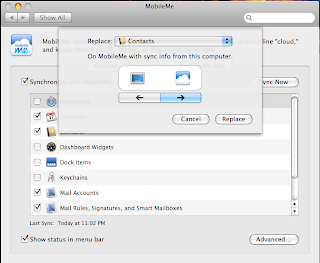
Go to your Mac's system preferences; Select the "mobileme" icon; click on the "sync" tab; click on the "advanced" button; click on "reset sync data..." button; Select the correct arrow, the one pointing to the right side means that will replace all the contents on Mobileme with the contents on your Mac (if your Mobileme Contact list is empty and then you replace the contents on your Mac with the contents on your mobileMe then... your data will be deleted!); in the section "Replace" select the "contacts" icon; click the "replace" button and then check your MobileMe Contact page... all your contacts will be there!

Problem 2: I can't see my calendar items

Even it took some time for my calendars to appear on the www.me.com site they arrived... The problem is that I could not find my events there. So I made an event from the Web interface and in a few seconds it appeared on my Mac's iCal, but on the wrong hour! Why?
Well it looks like the time zone is not being transfered. I just changed the time zone from the Web interface... and the problem is fixed.

Check the "preferences..." option; Go to the "Advanced" section; Select the correct time zone.


Wednesday, January 16, 2008

Message from an Apple representative about iPod touch upgrade:"...This software upgrade is available only where the iTunes Store is available..."

So it looks like there is nothing to do. The upgrade for iPod Touch is not available at this moment for people like me. So all of us that bought the iPod Touch in the past few days or weeks with the hope of more software within it... we are fried.
The e-mail message is:

"Dear Jose Antonio,

Thank you for inquiring about the new iPod touch software upgrade that adds the Mail, Stocks, Maps, Weather, and Notes applications to iPod touch.

This software upgrade is available only where the iTunes Store is available. Unfortunately, we currently do not have an iTunes Store in your country, so you will not be able to take advantage of this software upgrade.

Although I cannot comment on future expansion plans of the iTunes Store, please rest assured that we are committed to bringing the iTunes Store to people around the world.

Thank you for your interest in the iTunes Store and iPod touch. Apple appreciates your business.

Sincerely,

Stephanie
iTunes Store Customer Support
http://www.apple.com/support/itunes/ww/"

Tuesday, January 15, 2008

iPod Touch upgrade


As many of you know, Apple released today a great update to the iPod Touch. It makes the gadget useful in my opinion. Before that is just an beautiful ipod with a under-used screen and interface. Now... it makes sense.

For owners of iPod Touch: bad news! you need to buy the software upgrade. That sounds to me strange. But for users of iPod Touch residents on any country that is not included in the "allowed" list for creating accounts in the iTunes store... they are fried! because you can't but the upgrade. I live in Slovenia, I bought the iPod Touch in a local authorized reseller, and I can't create an account in iTunes, therefore I can't upgrade. Let's hope that Apple will fix that mistake!

For any new iPod Touch: good news! your gadget will be loaded with the software. Just double check on your local retail store... otherwise you will be pushed to pay 20 dollars.

Tuesday, January 08, 2008

New from Apple: A new server and a new powerful workstation

Apple unleashes new Xserve and new Mac Pro.
2 very powerful choices going to fight with PC manufacturers like HP and Dell. Why?
Apple is known for making good machines for people working on multimedia and design. And it looks like they don't want to forget that space of the market and let it to their competition. That goes for the Mac Pro.
Xserve is making a change: unlimited user licenses including in the price of the server. That makes me think that Apple is thinking on becoming a good alternative for Web servers. The Mac OS X Server sounds interesting because it tries to compete with Microsoft by including a Calendar server named iCal Server like part of the OS; Microsoft offers that with Exchange Server. They also include Wiki Server like an alternative for Blog and Wiki hosting, something that could become competition to Windows SharePoint Services.
MacWorld starts in one week.

Saturday, November 24, 2007

Upgrade from iPhoto '06 to iPhoto '08

It is amazing that there is no easy way to find a solution for the following problem:

"I have a MacBook and there I use the iLive '06. Now I got a new iMac and I would like to free some space on the notebook and move all iPhoto library. The trick is that the MacBook uses a newer version of iLife. How to do it?"
  1. First of all forget about looking for some "import" or "export" function. Those are for exporting pictures or photos, not for exporting the library. That would not get details and custom properties from the pictures like: keywords, name of the roll, dates.
  2. Burning to a DVD is an option. But if your Library is too big then the task is complex.
  3. Make a backup of your current library (Source computer - MacBook in my case). You can find it on "Home"; "Pictures".
  4. Go to the new computer (target computer) and find the same folder in the same location. You will delete the Library folder and replace it with the one you backed up.
    Attention! When you will delete the "target" "iPhoto Library" you will delete all the contents of that iPhoto. In my case I had none... I'm talking about a clean and just installed iPhoto '08.
  5. Once the copy process finishes, and not before, open the iPhoto, it will request you to update the library. Accept and go forward.
  6. That's it! All will be working like in your other computer!
Tip!: The same applies for moving the music library from iTunes!! and it will keep your podcasts and videocasts subscriptions. All working like nothing happened!

Thursday, November 22, 2007

Problems with iMovie'08 and Mac OS 10.5 (Leopard)

I have an iMac with a clean installation of the operating system (Leopard) and the iLife 2008. All fine but I found that my iVideo was just not starting. I removed the software and installed it again; no effect.
Something interesting was that the other applications found that there is an update but anyway I couldn't download it using the "software update". So I ignored this step...
The error message on iVideo was:


So, how I found the solution... Looking on Google? no. I did it but I couldn't find a solution...
So I went to Apple web site... :)

When I installed that update all went fine! and then the "software update" functionality worked perfect and installed all the rest of the updates.

You will find the link to the download on the page of each one of the products of iLife. It looks something like this:If you find more interesting ways to solve issues regarding your iLife 08 and your new Leopard (Mac OSX 10.5) please write a comment. And enjoy!

Wednesday, October 03, 2007

iWork Numbers: Apple's spreadsheet - Part 2

I'm constantly working with calculations from Information I get on the Web. That means that I get and copy a table with data from the Web and then I paste it in Excel and all works pretty well. Excel takes care of placing the information in the right cell. Often I need to make changes on the formatting but that is just a minor issue.
In the case of Numbers it is not possible to copy and paste from the web and get something right. Here is the source table from a web site:


And here what Numbers makes when pasting the table:

That is not a big issue, but it is important if Apple really wishes that advanced users will find on Numbers a real alternative. Importing data from the web and other kind of databases is very important.

Thursday, September 27, 2007

iWork Numbers: Apple's spreadsheet - Part 1

Numbers is the name of the new spreadsheet from Apple. It is part of the iWork suite and I just started testing it. I must say that I'm a user of Microsoft Excel and until now I found nothing wrong on it, all the opposite: Excel is a great tool that helps me to manage my company. Said that, I have to confess that Numbers is a real competitor for Excel.
There is a place where Numbers can't compete ant it is in the area of data management: pivot tables, conexion to Windows SharePoint Services and other sources of information.
In other areas Numbers introduced many interesting concepts and broke the paradigm of working with spreadsheets: boring grids full of cells that are unused.

I don't know why but one of the first things I looked for is the Zoom functionality. It is actually very useful for me when I have huge reports or when I work in a high resolution screen and then I change to other with lower resolution. The Zoom functionality exists and I must say that works like it should: it doesn't affect much the quality and visibility of the texts and images.


Numbers can manage multiple sheets and handle many components inside of each one. Components like tables and charts.
Numbers organizes those component in a left side bar and it makes it very easy to understand an manipulate.
Numbers handles each table like a different worksheet. And that is where makes the difference with Excel. Numbers is build to organize different components in "sheets", those components are not over a grid of cels, they are over an empty space. The tables can be moved and located wherever needed on the page and act independently from other tables in the same sheet.
Numbers works very good with images so the images are also inserted on the empty spaces and that is powerful because simplifies the work of reporting. In my personal case I work on reports only so I get the data from a database and then I build my report on Excel, managing images is also simple in Excel but it is a problem to format correctly because the images are actually floating over some other cells.
I think that Office 2007 is actually more powerful with image components and shapes. Numbers gives the basics but makes it very usable and simple.

On the left side, just bellow the section where the sheets are organized there is a section of styles. Those are simple color schemes for formating the tables. They are nice looking but I would like to see more.
It is not necessarily needed but having more doesn't heart.
In any case each style can be customized on the same page by changing the colors of the cells, fonts and backgrounds.
Numbers also lets you to create and add styles. I just need to discover how...

Tomorrow I will be writing the next part of my discoveries with Numbers. Stay tuned!

Tuesday, September 18, 2007

Yes, Apple iPhone in UK on November 9

Finally the iPhone is getting closer and closer for European users. The first country receiving it is UK. You can read more about on Apple's web site.
O2 will be the exclusive carrier for the UK.
An article is also available in News.com.

Monday, August 27, 2007

Learn more about your Mac

In the Windows world it is not so easy to get a good software for capturing screenshots or to learn some very useful shortcuts to perform some tasks. In the Mac is not needed event to look for that software because many are part of the operating system (OS).

Like in the image: if you press "command" + "shift" + "4" will give you the chance to capture a section of your screen. Just with this trick you can save some 20$ in a software like that. There are many other tips like that so I advise you to visit the video tips in Apple site. Click here to check them.

Friday, August 17, 2007

iMovie ’08, avoid problems on upgrading, buying or replacing

I'm waiting for buying the new iLife, it is still not available in Slovenia, but it is coming in a few days. And while waiting I found a very important post about iMovie '08 you need to read before upgrading or buying the iLife '08. Click here to read it.
It looks like you will not be able to open your iMovie '06 files on the new version, also you will be incapable of using your iMovie '06 plugins. The article is so important that could cause a delay in my decision to buy the software! Why? because I will buy soon 2 macs, so they will come with it for free, while I keep the superior iMovie '06 on my notebook.

Wednesday, August 08, 2007

Upgrade iWork '06 to iWork '08

As you may know, yesterday, Steve jobs released new iMacs, new iLive '08 and new iWork 'o8.
the problem is that just 3 weeks ago I bought my iWork '06 so I was worried about how to upgrade. Maybe they will give me a free new version? or maybe an upgrade price?
Well, I have called Apple and they told me that it could be changed if I bought the iWork within the past 2 weeks.

In my case that's not possible because I bought it 3 weeks ago. But if you just bought iWork or iLive you can receive a replacement with the new version. That's good news.
Actually I feel not a lot of pain because the price of the new iWork is really low and now it comes with a spreadsheet that I really want to see.

Something also interesting is that the .Mac now gives you 10GB instead of 1GB for the same price than before.

Saturday, April 28, 2007

Apple: solution for MacBooks with battery problems

Some weeks ago I had a problem with my battery (MacBook). It was just unable to charge and the computer could not detect a battery on the system. It was just displaying an "x" where normally was the battery icon.
At that moment the solution was to replace the battery. I went to my local Apple store and after some days I received my new battery.
But now Apple released an update that can solve that problem: click here.

Saturday, February 10, 2007

How the music business work online?

I took some minutes to read a message from Steve Jobs regarding the part of the music industry that concerns his company. It is truly interesting and to tell you the truth helped me to understand the "mistery" of "DRM" or digital rights management.
It also offers interesting numbers.

Monday, January 15, 2007

iMovie basic training

Lately I'm working very hard with iMovie HD for making some videos for a customer.
The product comes with a series of interesting tools, effects, transitions and technologies. I find it good for family videos if talking about the product out of the box. But actually become very powerful if enhanced with software designed for iMovie HD.
You can find a free training guide (I really advise it... it would save me some time if I would know about it some weeks ago) like part of the free training that the Shireland Language College (Birmingham, UK) publishes on their web site.