If you are interested please visit this report on news.com:
http://news.cnet.com/8301-1023_3-9992404-93.html
Some of you might get lucky!
Wednesday, July 16, 2008
Apple offers 30 days free to"some" MobileMe customers

Monday, July 14, 2008
Mobileme: Solving problems part 1 (for mac)
Apple's new service named "MobileMe" it is a really interesting bet on the online market.
Since its lunch there are many users experiencing problems of many different kind, including me.
First of all, I think the problem is caused because of the huge traffic the Apple servers are facing, more than 1 million new iPhones sold in a weekend! plus all users like you and me trying to evaluate the free trial of MobileMe.
Problem 1: No contacts on the www.me.com
After setting up my account and configuring my computer (Mac) I wanted to see if my contacts were on the online version of my address book. They weren't!
The solution is:
(Please be sure to have a backup of your contacts, otherwise if you make the wrong click you could delete them!)
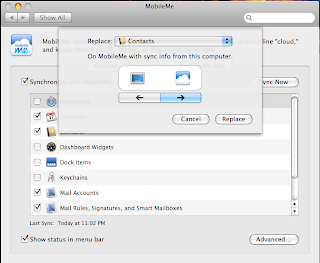
Go to your Mac's system preferences; Select the "mobileme" icon; click on the "sync" tab; click on the "advanced" button; click on "reset sync data..." button; Select the correct arrow, the one pointing to the right side means that will replace all the contents on Mobileme with the contents on your Mac (if your Mobileme Contact list is empty and then you replace the contents on your Mac with the contents on your mobileMe then... your data will be deleted!); in the section "Replace" select the "contacts" icon; click the "replace" button and then check your MobileMe Contact page... all your contacts will be there!
Problem 2: I can't see my calendar items
Even it took some time for my calendars to appear on the www.me.com site they arrived... The problem is that I could not find my events there. So I made an event from the Web interface and in a few seconds it appeared on my Mac's iCal, but on the wrong hour! Why?
Well it looks like the time zone is not being transfered. I just changed the time zone from the Web interface... and the problem is fixed.
 Check the "preferences..." option; Go to the "Advanced" section; Select the correct time zone.
Microsoft's Worldwide Partner Conference 2008 in Houston
 It was a great event! I had the chance of meeting very important persons, very interesting and clever people and definitively I'm now home with a backpack full of new things to think about.
There is a lot of information useful for Microsoft partners and I will try to update the conclusions and thoughts on a new Blog. Click here to visit it and see some of the pictures.
Wednesday, June 25, 2008
101 Photoshop tips for Mac and PC
One of the best ways to use video to spread knowledge and experience!
Tuesday, June 17, 2008
Smb-email.com A new service to help small organizations!

Well definitively many small organizations would benefit from it. And yes now it is possible! You can do it yourself or you can request help for the setup.
There are many SMBs that would like someone to setup the service for them, instead of managing DNS records, IP numbers and domains. You can find the service available in www.smb-mail.com
As you may know Windows Live Servcies are free and one of the most powerful and useful of them is Windows Live Hotmail, previously named MSN Hotmail. It includes 5GB of storage space, antispam, antivirus and Outlook like functionality. You can drag and drop elements from your Inbox to any other folder and even send meeting requests.
Windows Live Hotmail is integrated with Windows Live Calendar. A great mix of services!
There are some videos available for you to see some great features: click here.
SharePoint Simple CMS 3
If you are editing your Web site, you can make mistakes. Deleting contents is something that worries the most. Check this video to learn how to solve that problem for your SharePoint Simple CMS site:
Sunday, June 15, 2008
Video 2: SharePoint Simple CMS
The power of having a Web Site ready in a couple of minutes is something the SharePoint Simple CMS knows to do. It is a good sample of using SharePoint technologies to make our work easier.
Saturday, June 14, 2008
Video 1: SharePoint Simple CMS
The SharePoint Simple CMS is a new product developed to enhance Windows SharePoint Services and Office SharePoint Server web sites. It is a CMS because it helps users to edit their contents.
How can you use it? Well there are many ways...
- It lets you to have the Web design that you wish.
- It lets you use Web design templates: www.pixelmill.com
- Can be used within enterprises as departmental web sites or even internal Blogs or even team collaboration sites. The difference is that this sites look great!
- For SMB or SME this is the right solution for easy to edit, browser editable, rights managed Web sites.
- For Schools... there is a special template designed for schools.
- Are you applying to Grants or Tenders? this can be a great way of having a site for your project.
Would you like to develop on top of SharePoint Simple CMS? just contact me.
Friday, May 23, 2008
Ideas, ideas, ideas
Yes, the Web is a place for inspiration... I like that business:
Visit www.moo.com
Wednesday, May 07, 2008
From Yahoo side:
I think that makes more clear some of the concepts that rules on companies like Yahoo!
I hope Microsoft will take advantage of the experience and I hope that Yahoo! will reinvent itself. I'm personally convinced that both of them independently can and should fight stronger with Google.
Subscribe to:
Posts (Atom)
